cloister
I play hardware live: a kick, an FM drum, the tops off a drum machine, and a MiniBrute 2S. I wanted my own delay and reverb on every one of them, from an iPad, without four plugin windows and a host app in the way. So I vibecoded one with AI in three days, and then tested it hard in my own rig before taking it to LISTEN.
What it is
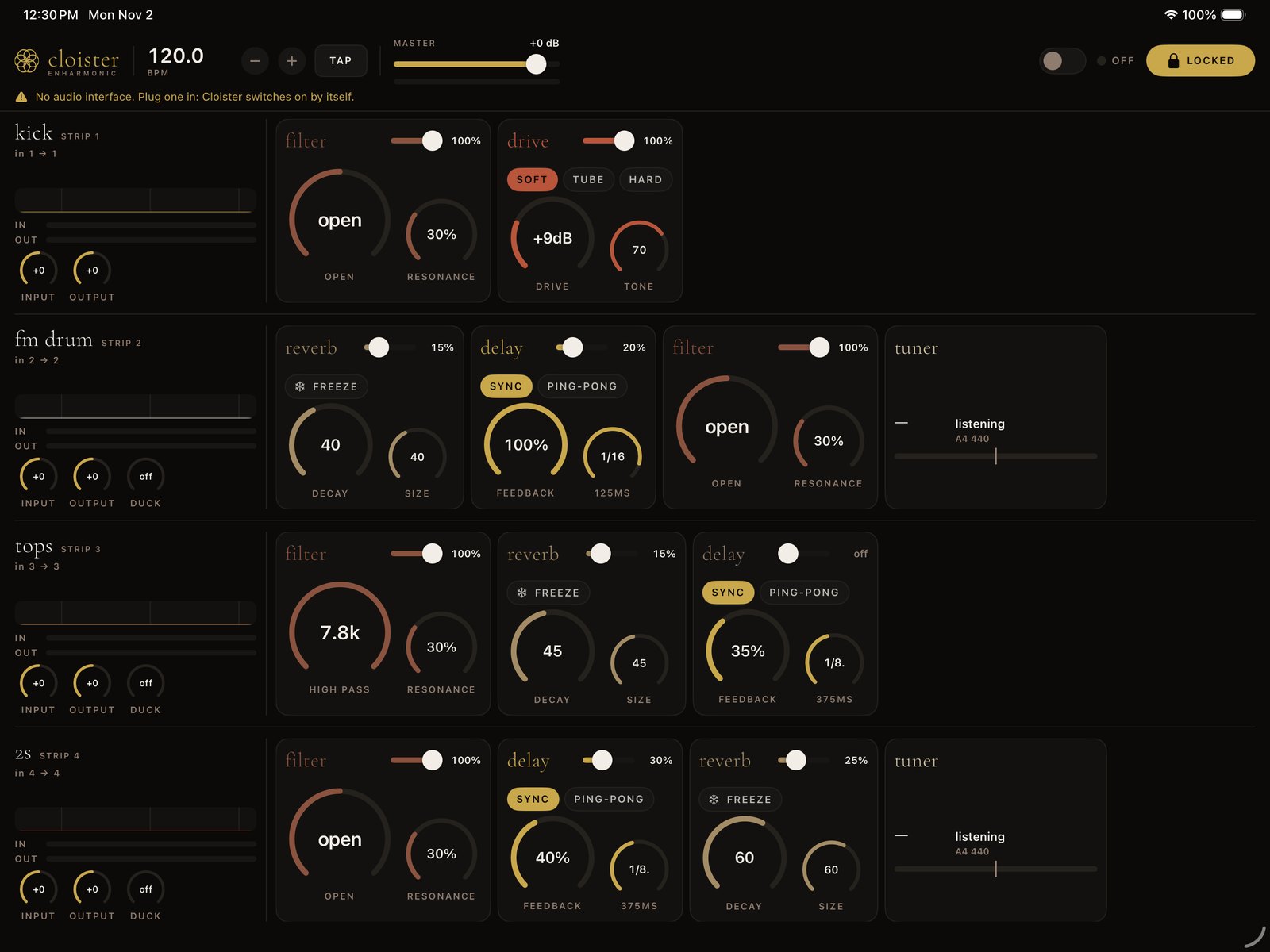
Four channels, side by side, like a small mixer. Each one takes an input from the USB audio interface, runs it through its own effects, and sends it to its own output, so each instrument keeps its own channel on the desk.
- Filter: the one-knob DJ filter from my VCV modules Halo and Mote. Low pass to the left, open in the middle, high pass to the right.
- Delay: stereo, tempo-synced or free, with saturation inside the feedback loop so it can run away without blowing up.
- Reverb: a plate after Jon Dattorro's 1997 design, with FREEZE.
- Drive: soft, tube and hard curves, antialiased so heavy drive stays clean. Made for the kick.
- Tuner on the pitched channels, and a sidechain duck so the kick can pump everything else.
Lock it and nothing moves under your fingers. That's the mode I play in.
Day 1 · Oct 31From a delay to four channels
It started as one delay and one plate reverb running inside an iPad app. By the end of the day it had four channels, routing for every input and output on the interface, room for my own Audio Unit plugins, the DJ filter, and a drive for the kick.
The first real bug was a silent pair of outputs. Outs 3 and 4 worked on my MiniFuse 4, and 1 and 2 made no sound at all. The engine had been connected with a generic stereo layout and not the interface's real four channels. Once it used the hardware's own layout, every output played.
It was called Wake for about a day. The name I wanted next, Vesper, was already an iOS effects app. Cloister stuck: an arched walkway that sound moves through.
Day 2 · Nov 1Playing it
i played a jam with this yesterday for 40 min, all routes workedMe, the next morning
Forty minutes through real cables is a different test from a simulator. The next fixes were the ones that matter at a gig: coming back on by itself after an interruption, and after the interface gets unplugged and plugged back in.
Day 3 · Nov 2Making it mine
Day three was design rounds on the iPad. I'd play, say what was wrong, and get a new build to try. Some of what changed:
- A tuner on the FM drum and the 2S, and a live spectrum on every channel.
- The sidechain. I asked for a duck from the kick. The first one clamped, and I said:
ducking is pretty intense... it should feel more pumpyMe, mid-session
- So the duck now dips in about 6 ms, holds for a moment, and swells back over about 400 ms. That's the pump.
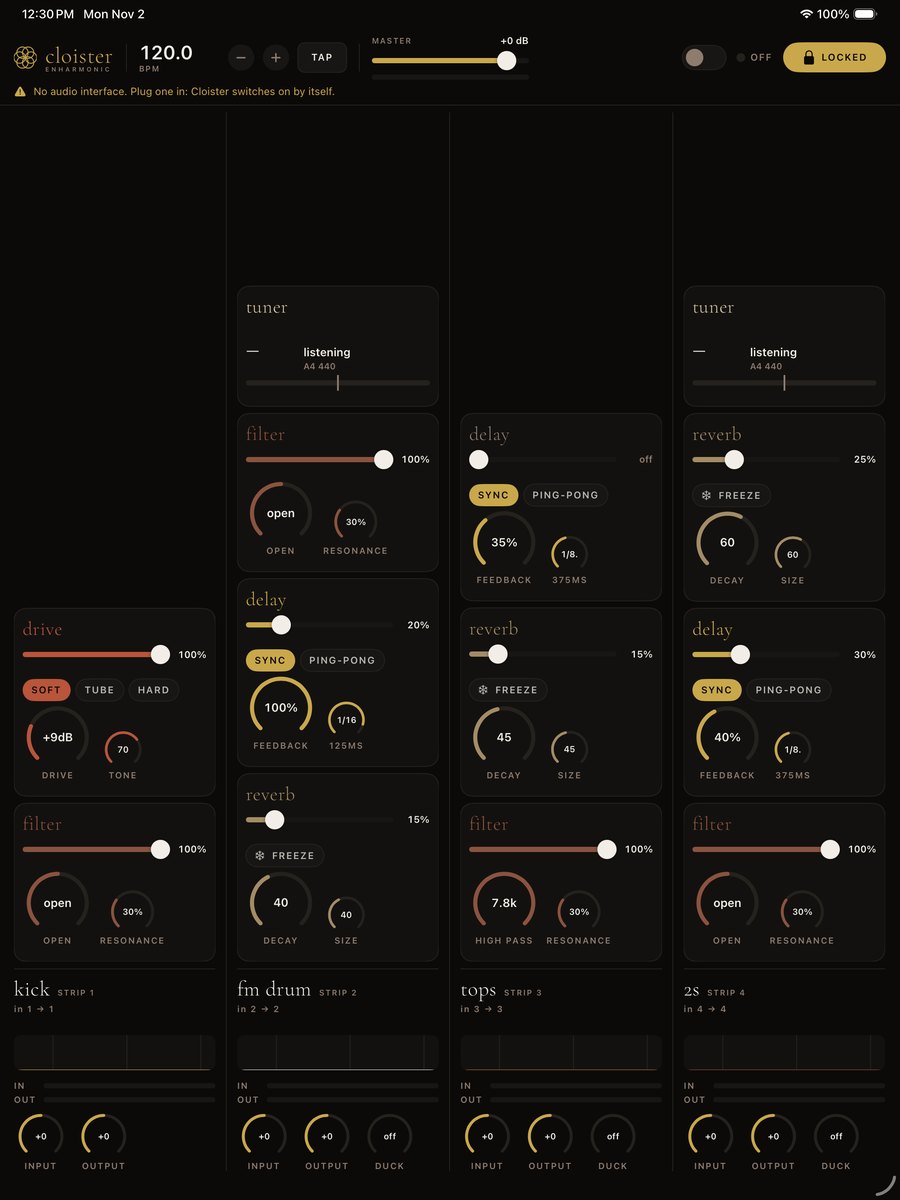
- Every effect's on/off became a dry/wet slider. Big knob on the left, small knob on the right, chips on top.
- One design language: three label sizes, three corner radii, knob rings in proportion. The boxes around the channels gave way to a hairline between them.
The bug that hid twice
Dragging a card to reorder the effects worked in the simulator and did nothing on the iPad. Twice.
First, the scroll views around each row were taking the touch before the drag ever saw it. The fix was the iPad's own long-press, the one built-in lists use.
Then the card moved, but not with my finger in landscape. The finger's position was being read in the window's own coordinates, which don't turn when the iPad turns. Measuring against the app's root view fixed it.
The simulator's fake touches hid both bugs. Only real fingers on real glass found them.
The test before the gig
Before LISTEN, every one of these had to pass on the iPad, live, with the interface plugged in, on the exact build I'm taking:
| Check | What happens | |
|---|---|---|
| Open the app | Comes up locked and live | PASS |
| Routing | Every input of the interface is there to pick | PASS |
| Sidechain | At about 50% the duck pumps with the kick | PASS |
| Unplug the interface | Sound comes back on its own when it's plugged in again | PASS |
| An alarm goes off | Sound carries on once it's dismissed | PASS |
| Lock the screen | Sound keeps going | PASS |
| Airplane mode | Sound keeps going | PASS |
| Drag to reorder | Follows the finger in both orientations | PASS |
I also made a one-page camp card for when something goes wrong with no laptop around. The last resort on it is the honest one: patch straight into the mixer and play dry. The set goes on.
How the AI fit in
I described what I wanted, played it, and said what was wrong. The AI wrote the code, built it, tested it in the iPad simulator, and installed builds on my iPad, but only after I said yes to each one. It also kept the notes: every hardware check above was logged as I ran it.
The judgment was mine: what it should feel like, which knob gets to be big, when the pump finally felt right. Three days, 32 commits, and an app I trust on stage.
What it stands on
- Plate reverb: Jon Dattorro, "Effect Design, Part 1: Reverberator and Other Filters," Journal of the Audio Engineering Society, 1997.
- Antialiased drive: Julian D. Parker, Vadim Zavalishin and Efflam Le Bivic, "Reducing the Aliasing of Nonlinear Waveshaping Using Continuous-Time Convolution," DAFx 2016.
- Tuner: Alain de Cheveigné and Hideki Kawahara, "YIN, a fundamental frequency estimator for speech and music," JASA, 2002.
- Filter: a topology-preserving state-variable filter, after Andrew Simper (Cytomic). The one-knob mapping comes from my own VCV modules Halo and Mote.
- Type: Cormorant Garamond by Christian Thalmann (Catharsis Fonts), SIL Open Font License.
What's next
Cloister is headed to the App Store for iPad. If you want it on your iPhone, tell me. Every request counts toward building it. After that: MIDI control of the knobs, so a hardware controller can drive the filter and the delay.
Debut: LISTEN, Idyllwild, November 5–8, 2026.